> ## Documentation Index
> Fetch the complete documentation index at: https://cogno.studio/docs/llms.txt
> Use this file to discover all available pages before exploring further.
# Use Cogno behind a corporate proxy
> How the Engine reaches the internet on a managed network, which hosts to allow, and how to set a proxy or certificate by hand.
On a company network the Cogno window can load normally while the **Engine** on the same
computer cannot connect. This page explains why, what the Engine does about it on its own,
and how to set the proxy or a certificate yourself when automatic detection is not enough.
It is for the person using the computer and for the IT team that manages its network.
## How the Engine connects
The Cogno window and the Engine take different routes. The window talks to
`app.cogno.studio`. The Engine is a separate background program: it connects to the Cogno
API directly, and the agents it runs connect to their own providers and to GitHub.
The Engine finds the proxy for this computer in this order:
| Order | Source | Notes |
| - | - | - |
| 1 | Proxy environment variables (`HTTPS_PROXY`, `HTTP_PROXY`, `NO_PROXY`) | Used as they are when present. |
| 2 | The operating system's proxy settings | Windows: the manual proxy, a setup script (PAC) and automatic detection. macOS: the manual web proxy entries. |
The same proxy is handed to everything the Engine starts — Claude Code, Codex, `git` and the
GitHub CLI — so agent runs use it too.
If the chosen proxy cannot be reached, the Engine connects directly instead. A laptop that
uses a proxy at the office keeps working at home without any change.
On macOS the Engine reads manual proxy entries only. If your Mac gets its proxy from an
automatic configuration script alone, enter the proxy address by hand (below).
## Hosts to allow
Ask your IT team to allow outbound HTTPS (port 443) to these hosts, directly or through the
proxy.
| Host | Used for |
| - | - |
| `app.cogno.studio` | The Cogno window. |
| `cogno-core-api-756410923132.asia-northeast1.run.app` | The Engine's connection to Cogno: heartbeat, picking up work, reporting results. |
| `api.anthropic.com` | Agent runs with Claude Code. |
| `api.openai.com` | Agent runs with Codex. |
| `api.github.com`, `github.com` | Pushing branches and opening pull requests. |
The agent CLIs may contact further hosts of their own provider. **Test connection** (below)
shows what this computer can reach right now.
## Change the network settings on this computer
These settings are saved on this computer only. They are not part of your workspace and are
not sent to Cogno.
In the desktop app, open **Settings → Machines**. Under **This machine**, find
**Engine** and open **More actions**.
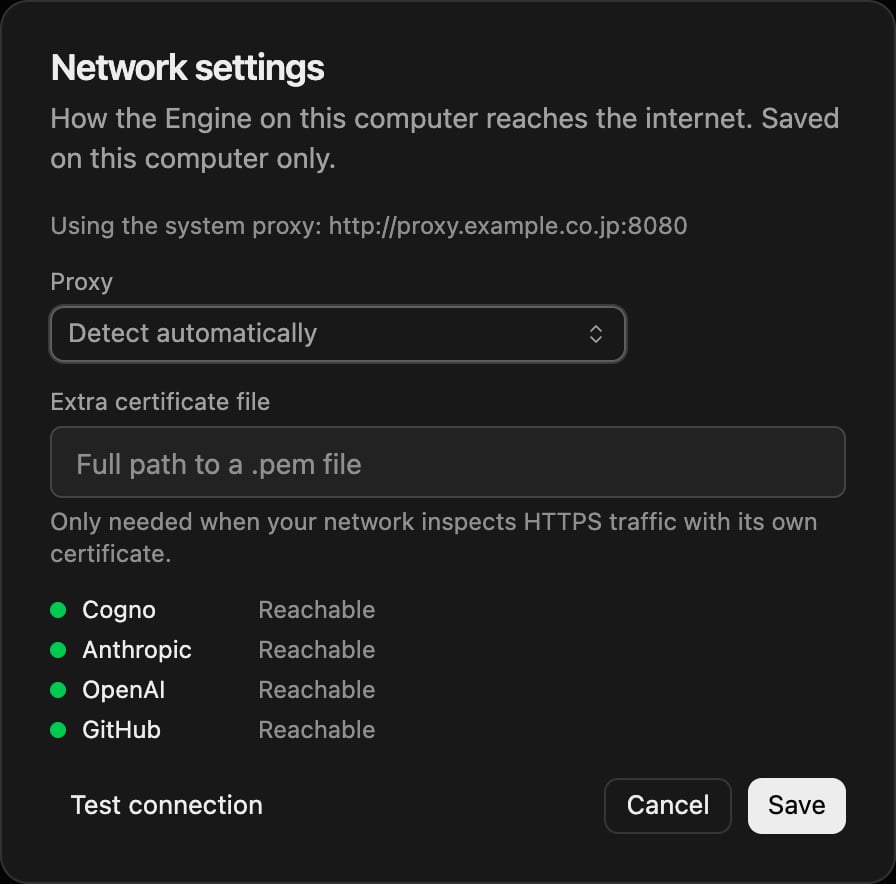
Choose **Network settings**. The first line shows what the Engine is using now — for
example **Connecting directly, with no proxy.**
Set **Proxy** to **Detect automatically**, **Enter manually** or **No proxy**. With
**Enter manually**, fill in **Proxy address** and, if some internal hosts must skip the
proxy, **Hosts that skip the proxy**.
Select **Test connection** to try Cogno, Anthropic, OpenAI and GitHub with these
settings, then **Save**.
 If the dialog says **Update the desktop app to change network settings on this computer.**,
install the latest desktop app first.
## Reference
| Field | Meaning | Notes |
| - | - | - |
| **Proxy** → **Detect automatically** | Environment variables, then the operating system's settings. | The default. |
| **Proxy** → **Enter manually** | Always use the address you enter. | Still falls back to a direct connection while that proxy is unreachable. |
| **Proxy** → **No proxy** | Always connect directly. | |
| **Proxy address** | `http://host:port`, or `host:port`. | `https://` and `socks5://` are accepted. A saved password is never shown again. |
| **Hosts that skip the proxy** | Comma-separated hosts that go direct. | `localhost` always goes direct. |
| **Extra certificate file** | Full path to a `.pem` file trusted in addition to the system certificates. | Only needed when your network inspects HTTPS traffic with its own certificate. Also passed to Node-based agents. |
## Troubleshooting
| Symptom | Likely cause | Fix |
| - | - | - |
| **Engine** shows **Connection degraded** and **The Engine cannot reach Cogno from this network.** | The network blocks the Engine's direct connection, or needs a proxy the Engine did not find. | Open **Network settings** and run **Test connection**. Do not reset the machine — your sign-in is fine. |
| **The address could not be found (DNS).** | The network does not resolve outside names without the proxy. | Set **Proxy** to **Enter manually** and enter your proxy. |
| **Timed out.** or **The connection was refused or blocked.** | A firewall blocks the host. | Ask IT to allow the hosts above. |
| **The certificate is signed by … which this computer does not trust.** | Your network inspects HTTPS. | Get that authority's certificate as a `.pem` file from IT and set **Extra certificate file**. |
| **The proxy asks for a username and password.** | The proxy needs credentials. | Include them in **Proxy address** (`http://user:password@host:port`), or ask IT to let the Cogno hosts through without authentication. |
| The proxy setting works at the office but not elsewhere. | The proxy is only reachable on the office network. | Nothing to do: the Engine connects directly while the proxy is unreachable. |
For anything not listed here, see [Troubleshooting](/docs/troubleshooting).
## Related docs
* [Manage your machines](/docs/machines)
* [Report a problem](/docs/report-a-problem)
This documentation is built and hosted on [Mintlify](https://mintlify.com), a developer documentation platform.
If the dialog says **Update the desktop app to change network settings on this computer.**,
install the latest desktop app first.
## Reference
| Field | Meaning | Notes |
| - | - | - |
| **Proxy** → **Detect automatically** | Environment variables, then the operating system's settings. | The default. |
| **Proxy** → **Enter manually** | Always use the address you enter. | Still falls back to a direct connection while that proxy is unreachable. |
| **Proxy** → **No proxy** | Always connect directly. | |
| **Proxy address** | `http://host:port`, or `host:port`. | `https://` and `socks5://` are accepted. A saved password is never shown again. |
| **Hosts that skip the proxy** | Comma-separated hosts that go direct. | `localhost` always goes direct. |
| **Extra certificate file** | Full path to a `.pem` file trusted in addition to the system certificates. | Only needed when your network inspects HTTPS traffic with its own certificate. Also passed to Node-based agents. |
## Troubleshooting
| Symptom | Likely cause | Fix |
| - | - | - |
| **Engine** shows **Connection degraded** and **The Engine cannot reach Cogno from this network.** | The network blocks the Engine's direct connection, or needs a proxy the Engine did not find. | Open **Network settings** and run **Test connection**. Do not reset the machine — your sign-in is fine. |
| **The address could not be found (DNS).** | The network does not resolve outside names without the proxy. | Set **Proxy** to **Enter manually** and enter your proxy. |
| **Timed out.** or **The connection was refused or blocked.** | A firewall blocks the host. | Ask IT to allow the hosts above. |
| **The certificate is signed by … which this computer does not trust.** | Your network inspects HTTPS. | Get that authority's certificate as a `.pem` file from IT and set **Extra certificate file**. |
| **The proxy asks for a username and password.** | The proxy needs credentials. | Include them in **Proxy address** (`http://user:password@host:port`), or ask IT to let the Cogno hosts through without authentication. |
| The proxy setting works at the office but not elsewhere. | The proxy is only reachable on the office network. | Nothing to do: the Engine connects directly while the proxy is unreachable. |
For anything not listed here, see [Troubleshooting](/docs/troubleshooting).
## Related docs
* [Manage your machines](/docs/machines)
* [Report a problem](/docs/report-a-problem)
This documentation is built and hosted on [Mintlify](https://mintlify.com), a developer documentation platform.