> ## Documentation Index
> Fetch the complete documentation index at: https://cogno.studio/docs/llms.txt
> Use this file to discover all available pages before exploring further.
# 0.2.8
> A Project can work across several folders, approvals name the exact operation, Project integrations narrow the Workspace's, and Teams and Discord become two-way.
## TL;DR
* **One Project, several folders.** Put a frontend, a backend, and a docs folder in one Project; runs start in the primary folder and can reach the rest.
* **Approvals say what they are for.** The card names the service and the operation, such as **Slack · Send a message**, and marks whether it only reads or sends something outside Cogno.
* **Project integrations follow the Workspace.** A Project inherits the Workspace's connections, can narrow them, or can switch a connection off.
* **Teams and Discord are two-way.** Mention @Cogno in Teams to get a reply in the chat; Cogno can read files and @mention people. In Discord, Cogno reads and posts in the Project's channels.
* **Sub-tasks close with their parent**, and you can undo it.
## Projects that work across several folders
A Project now holds an ordered list of folders. The top one is **Primary**: runs start there and can work in every other folder in the list. Use **Set as primary** to change it, and pick a **Base branch** for each repository.
To create a Project, open **New project**. You can pick existing folders, clone repositories from GitHub, or start a **New folder…**. The Project is named after the folder. When you open a teammate's Project on your Mac, **Quick setup** lists the folders it needs. For each one, you can use a local copy, clone it, or leave it out.
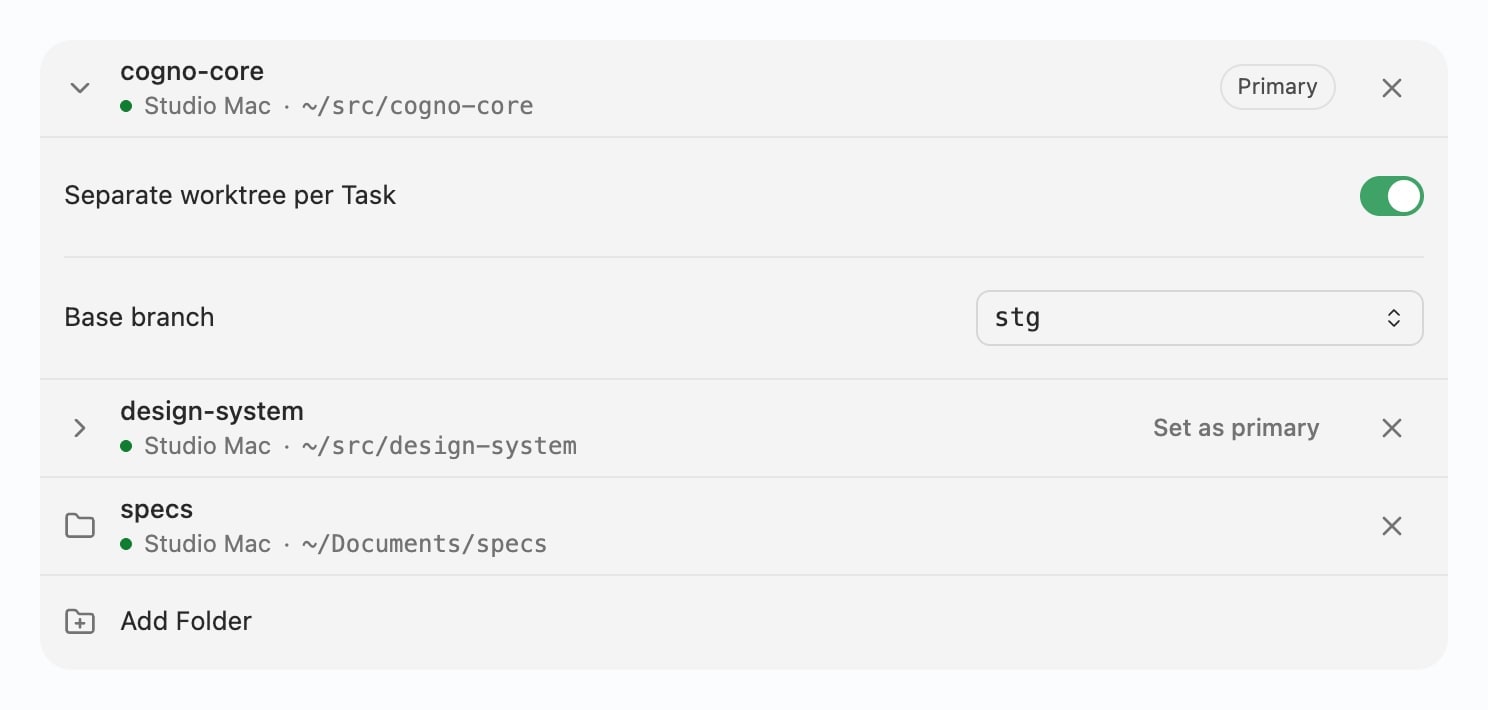 * A folder without Git just works in place, with no warning. **Separate worktree per Task** is a Project setting you can turn on for Git folders.
* Several Projects can now use the same repository.
* If a folder is missing from the machine, it shows as **Missing** and runs skip it until it is back.
Running a Project in several folders needs Cogno 0.2.8 on the machine that does the work.
## Approvals that name the operation
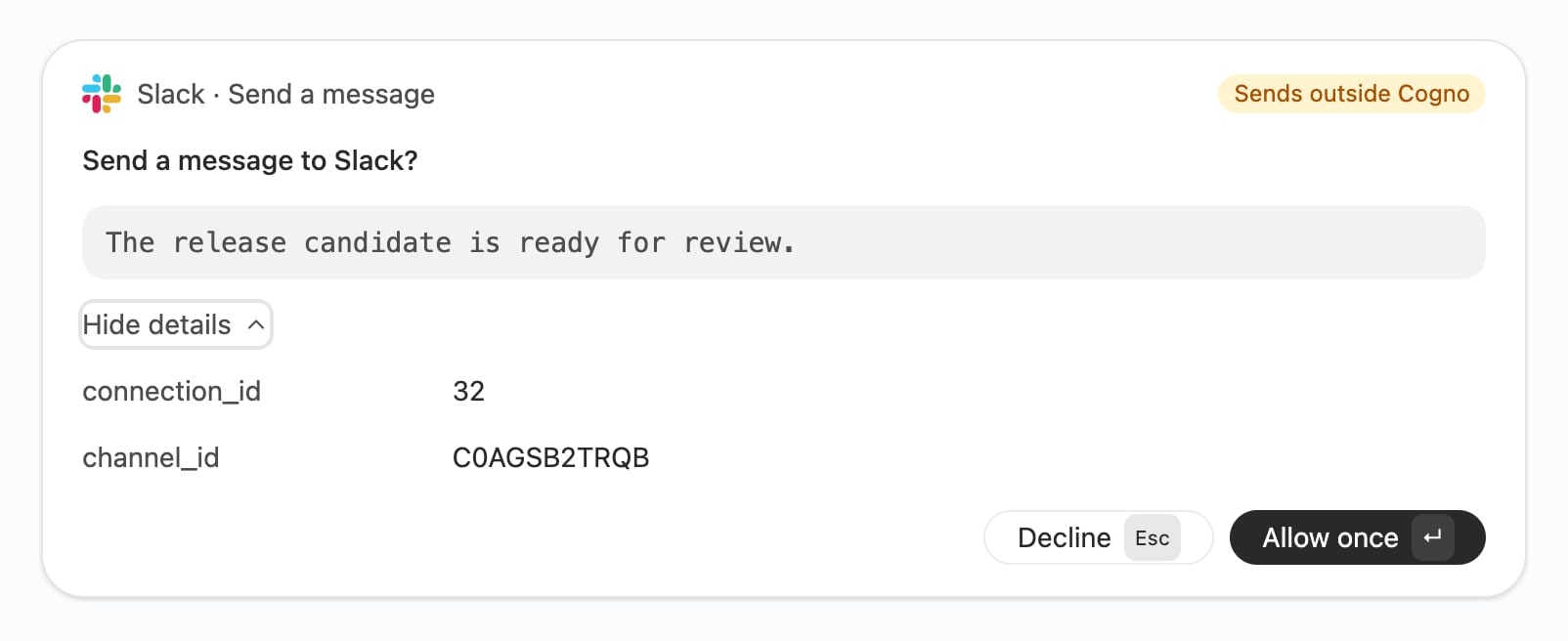
When a run asks before using a connected service, the card now says exactly what it wants to do. It shows the service, the operation, and whether the operation is **Read only** or **Sends outside Cogno**. The question matches, too: "Send a message to Slack?" instead of a generic "Approve this tool operation?".
* A folder without Git just works in place, with no warning. **Separate worktree per Task** is a Project setting you can turn on for Git folders.
* Several Projects can now use the same repository.
* If a folder is missing from the machine, it shows as **Missing** and runs skip it until it is back.
Running a Project in several folders needs Cogno 0.2.8 on the machine that does the work.
## Approvals that name the operation
When a run asks before using a connected service, the card now says exactly what it wants to do. It shows the service, the operation, and whether the operation is **Read only** or **Sends outside Cogno**. The question matches, too: "Send a message to Slack?" instead of a generic "Approve this tool operation?".
 ## Project integrations follow the Workspace
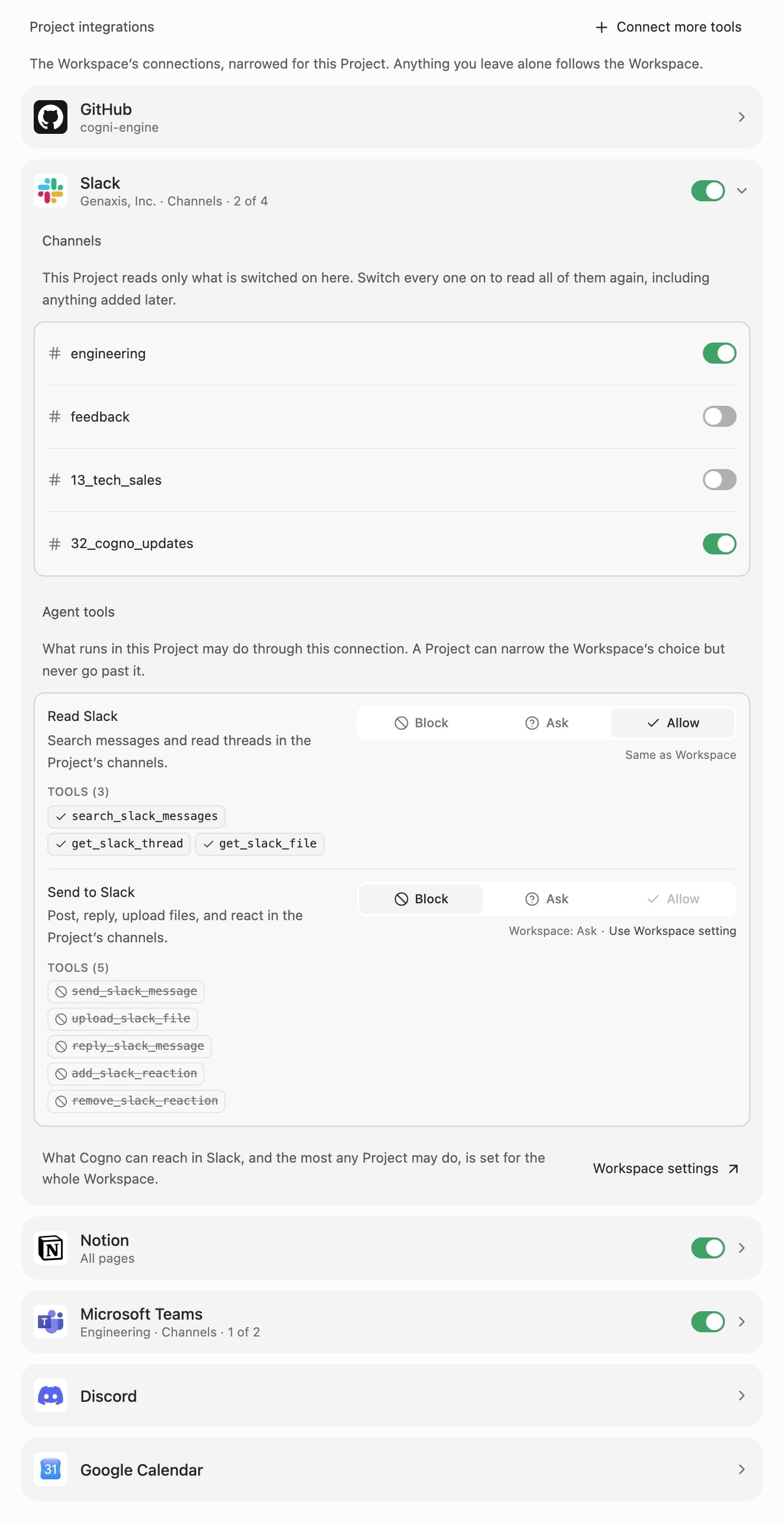
**Project settings → Integrations** now matches the Workspace's Integrations page. Anything you leave alone follows the Workspace. For each connection, a Project can:
* read **All channels** (or pages, spaces, projects), including anything added later, or only the ones you switch on;
* narrow **Agent tools**, which can never go past what the Workspace allows;
* switch the connection **Off** for this Project, so its runs can't use it at all.
## Project integrations follow the Workspace
**Project settings → Integrations** now matches the Workspace's Integrations page. Anything you leave alone follows the Workspace. For each connection, a Project can:
* read **All channels** (or pages, spaces, projects), including anything added later, or only the ones you switch on;
* narrow **Agent tools**, which can never go past what the Workspace allows;
* switch the connection **Off** for this Project, so its runs can't use it at all.
 ## Microsoft Teams: mention @Cogno, get an answer
* **@Cogno replies in the chat.** Mentioning Cogno in Teams starts work right away, and the answer is posted back to the same conversation.
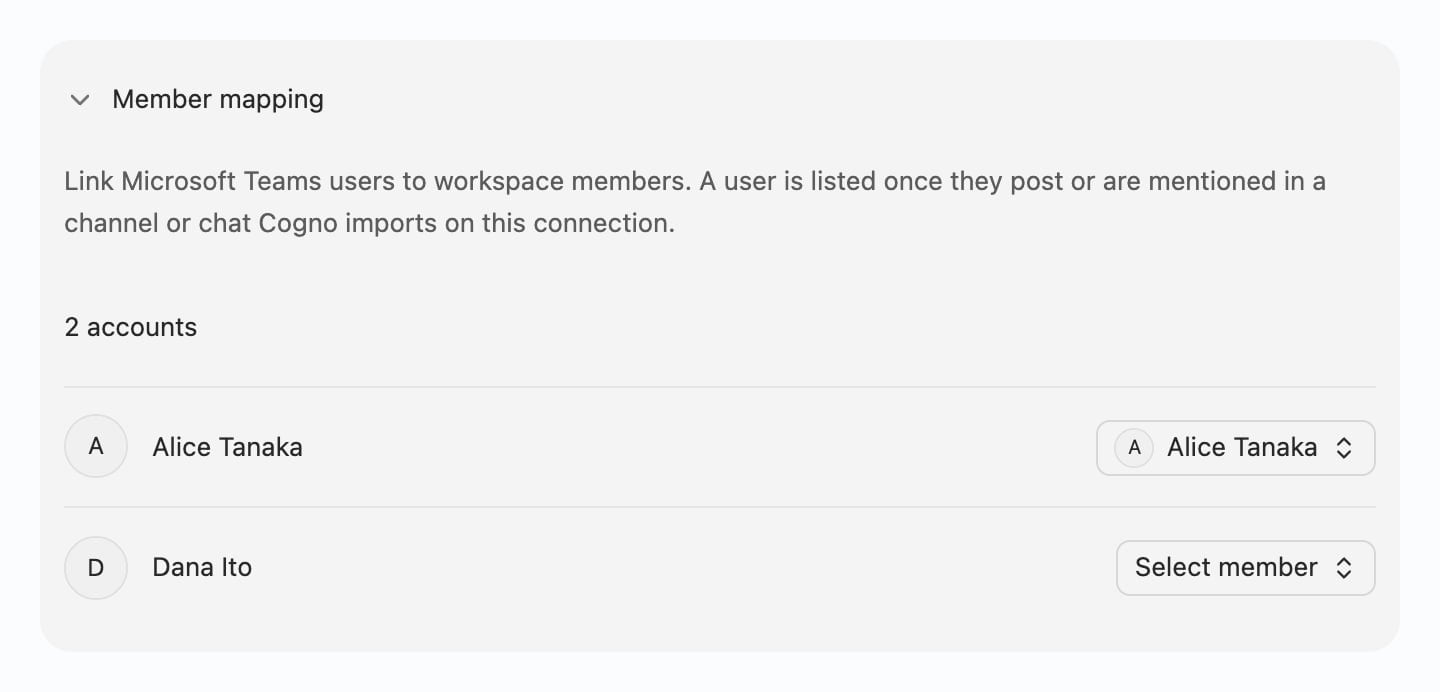
* **Member mapping** links Teams users to Workspace members. That lets Cogno know who said what, and lets it **@mention** the right person when it writes.
* **Files in Teams**: Cogno can open files attached in a Project's channels and chats, including SharePoint and OneDrive links.
## Microsoft Teams: mention @Cogno, get an answer
* **@Cogno replies in the chat.** Mentioning Cogno in Teams starts work right away, and the answer is posted back to the same conversation.
* **Member mapping** links Teams users to Workspace members. That lets Cogno know who said what, and lets it **@mention** the right person when it writes.
* **Files in Teams**: Cogno can open files attached in a Project's channels and chats, including SharePoint and OneDrive links.
 ## Discord: Cogno reads and posts
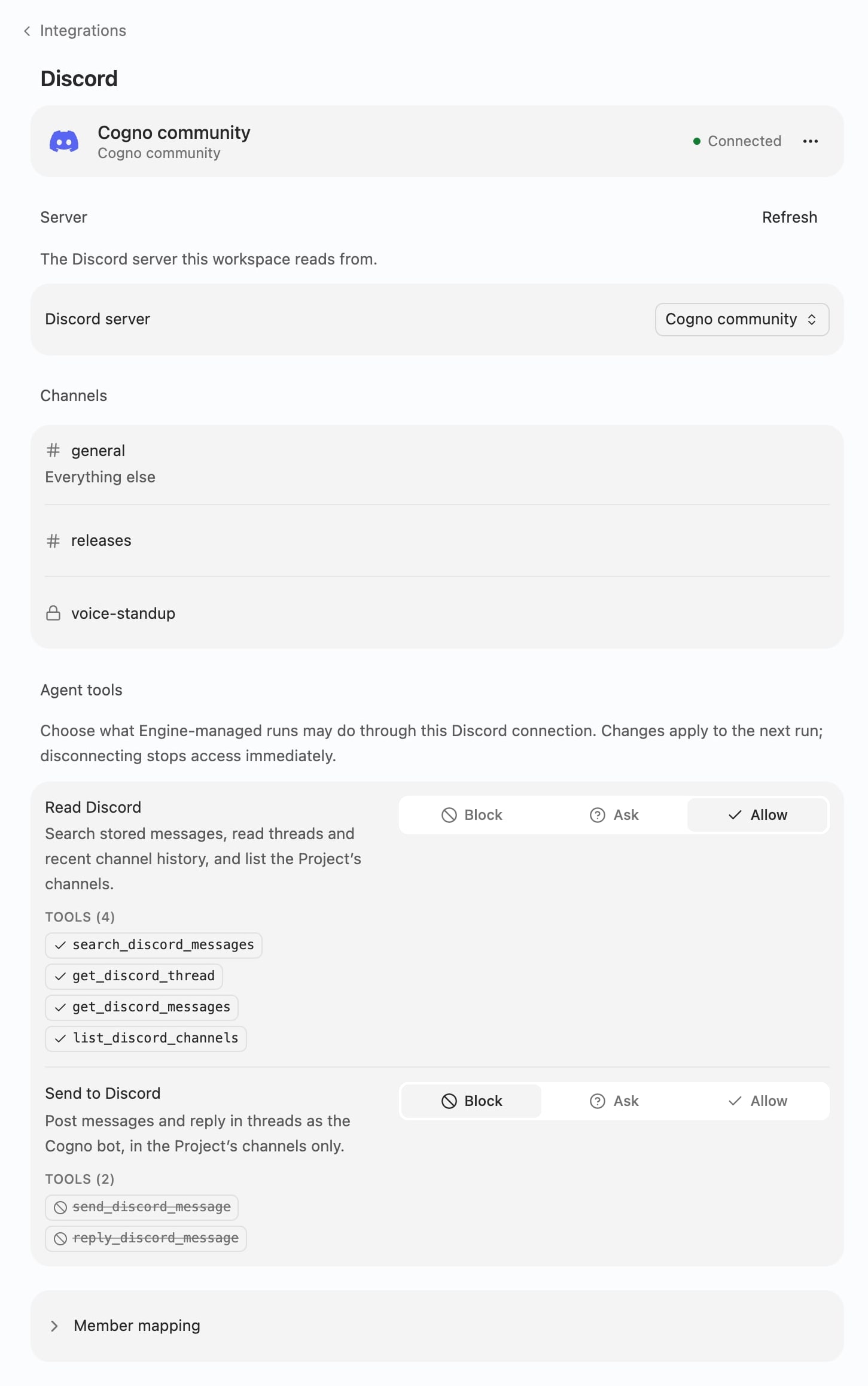
The Cogno bot can read, post, and reply in the channels you chose for the Project. It also marks messages that mention it, so you can see Cogno picked them up. Control this on the Discord integration page under **Agent tools** → **Read Discord** and **Send to Discord**.
## Discord: Cogno reads and posts
The Cogno bot can read, post, and reply in the channels you chose for the Project. It also marks messages that mention it, so you can see Cogno picked them up. Control this on the Discord integration page under **Agent tools** → **Read Discord** and **Send to Discord**.
 ## Sub-tasks move with their parent
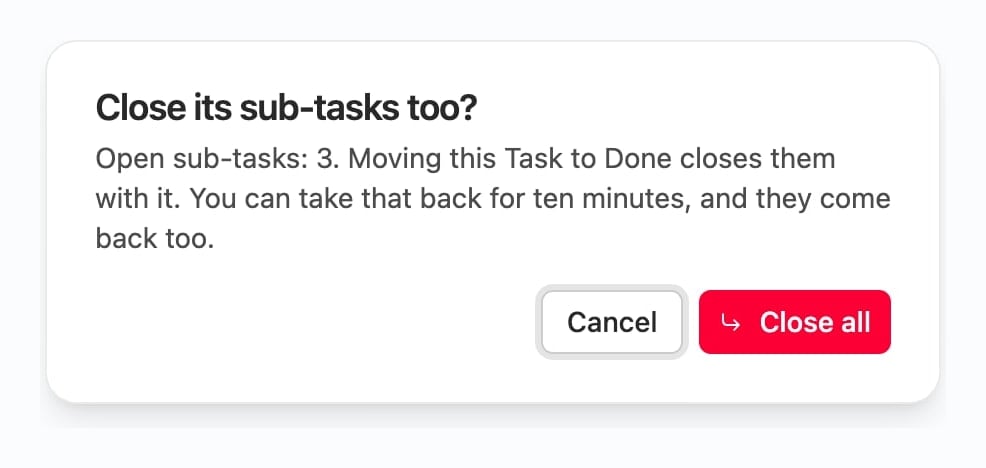
When you mark a Task done or rejected, Cogno asks **Close its sub-tasks too?**. You can take it back for ten minutes, and the sub-tasks come back with it. Sub-tasks always stay in their parent's Project. Cogno can now also read a Task's sub-tasks, and it can break work into Tasks without starting a run for each one.
## Sub-tasks move with their parent
When you mark a Task done or rejected, Cogno asks **Close its sub-tasks too?**. You can take it back for ten minutes, and the sub-tasks come back with it. Sub-tasks always stay in their parent's Project. Cogno can now also read a Task's sub-tasks, and it can break work into Tasks without starting a run for each one.
 ## Also in this release
* **Meetings:** a meeting's page shows **Task intake**: whether Cogno is still checking it, found nothing to do, or created Tasks.
* **Busy machine, free teammate:** if the Project owner's machine is busy with a Task, Cogno's Project work runs on another member's free machine.
* **Updates** live in a small chip at the right of the title bar (**Restart to update**) instead of a floating button.
* **Pull requests** on a Task are shown as a card with GitHub's status colors, and Kanban cards follow the GitHub Projects layout.
* **Screen recordings:** Cogno can record what it did on your Mac's screen and deliver it as a short video to the Task or Slack.
## Related docs
* [All releases](/docs/release-notes)
* [Projects](/docs/projects)
* [Connect Microsoft Teams](/docs/teams-integration)
* [Connect Discord](/docs/discord-integration)
This documentation is built and hosted on [Mintlify](https://mintlify.com), a developer documentation platform.
## Also in this release
* **Meetings:** a meeting's page shows **Task intake**: whether Cogno is still checking it, found nothing to do, or created Tasks.
* **Busy machine, free teammate:** if the Project owner's machine is busy with a Task, Cogno's Project work runs on another member's free machine.
* **Updates** live in a small chip at the right of the title bar (**Restart to update**) instead of a floating button.
* **Pull requests** on a Task are shown as a card with GitHub's status colors, and Kanban cards follow the GitHub Projects layout.
* **Screen recordings:** Cogno can record what it did on your Mac's screen and deliver it as a short video to the Task or Slack.
## Related docs
* [All releases](/docs/release-notes)
* [Projects](/docs/projects)
* [Connect Microsoft Teams](/docs/teams-integration)
* [Connect Discord](/docs/discord-integration)
This documentation is built and hosted on [Mintlify](https://mintlify.com), a developer documentation platform.