

Prerequisites
- You are the Task’s assignee.
- The Task runs on a teammate’s machine, or, for a Cloud Project, in the Cloud environment.
- Your machine has a ready folder for the Task’s Project. See Machines.
- The Task is not Done, Archived, or Rejected.
Continue a Task on your machine
When your Task runs on a teammate’s machine or in the Cloud environment, the line above the message box says Sending moves this run to your machine and stops it on ‘s (or …stops it in the Cloud environment). If you can’t take the run over yet, that line says why instead, for example when your machine has no folder for the Project. When a question addressed to you is open, the message box sends your answer to that question and keeps the run on its current machine. Choosing an option or the question’s × button also keeps the run there. See Answer a question in the conversation.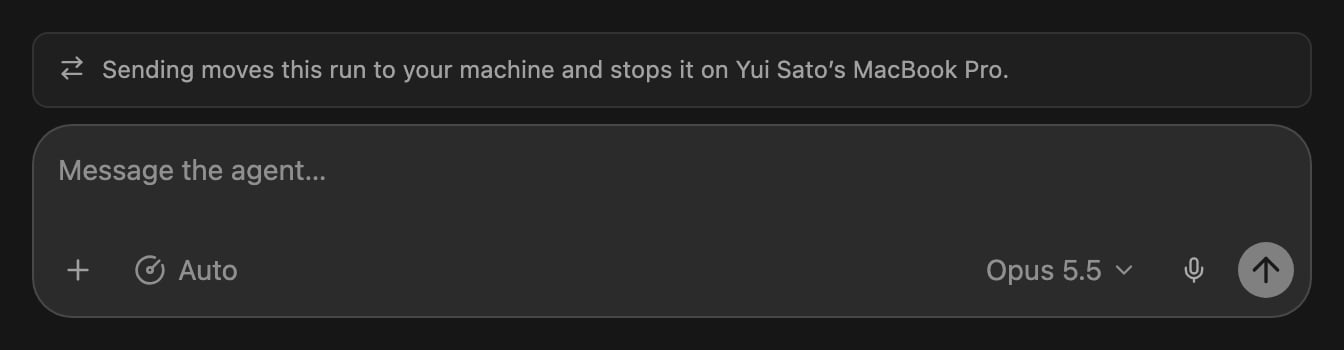
Your Task running on a teammate's machine
1
Open the Task
Open the Task in the desktop app or on the web.
2
Send a message
Type what to do next and send it. Cogno moves the run to your folder for
the Project and starts a new run on your machine from the description and
your message. The run on the previous machine stops.
What moves with the run
The new run starts on the same branch, with the uncommitted changes still
uncommitted. The run on the previous machine stops within about a minute. The
new run starts from the description.
When the machine running your Task stops responding
When the machine running a Task Cogno is working on stops responding for 10 minutes while the Task has work waiting, Cogno moves the run to another machine so the Task does not stall:- Your machine comes first, when it is online and has a ready folder for the Project.
- Otherwise, the run moves to a teammate’s machine that is online and has a ready folder for the Project.
- When no such machine is online, the Task waits where it is.
What Cogno keeps on your repository’s remote
To carry work that was not pushed, Cogno saves a checkpoint of the Task’s work at the end of every turn and pushes it to your repository’s remote asrefs/cogno/checkpoints/task-<Task ID>. Only folders that Run in a Worktree
are checkpointed; a folder set to Run directly is never touched.